21bit Mobile Australia: Browser Play, Install Option and Devices
 Available in US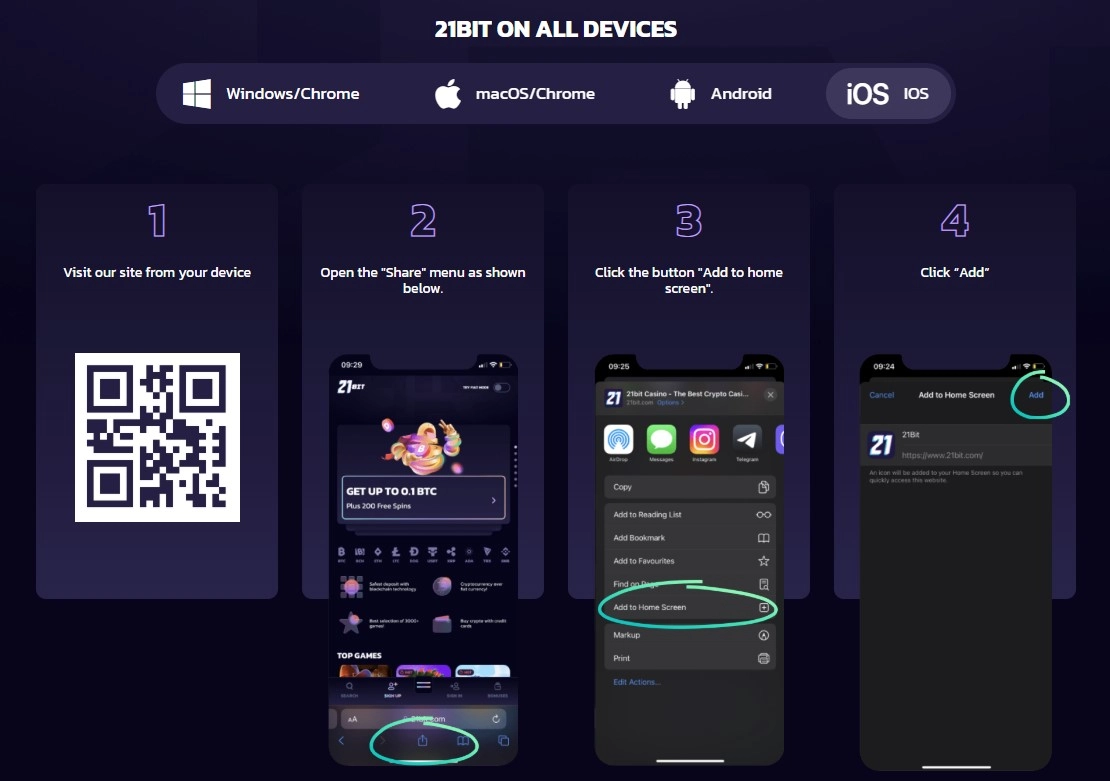
Content
For Australian users, the verified mobile option at 21bit is browser play. The current AU site also has an “Install app” route, but its own installation instructions tell users to choose “Add to home screen” and then “Add”. That is evidence of a browser-installed web experience or home-screen shortcut, not evidence of a native iOS App Store or Google Play application. No current native store listing is identified here, so this page does not describe 21bit as having a native Australian iPhone or Android app.
The practical result is simple: you can use the 21bit AU interface on a phone through the browser, reach registration, browse casino categories, open live casino areas, check banking information and access support. If you prefer an app-like icon, the site’s current install flow can add the web experience to the device home screen. The important distinction is where the software comes from and how it is installed.
Does 21bit have an app in Australia?
21bit uses the word “App” on its mobile installation page, but the observable installation steps are web-based. The AU page instructs the user to click an install control, choose “Add to home screen” and confirm with “Add”. That is the pattern used for a website shortcut or installable web app. It is materially different from opening Apple’s App Store or Google Play, finding a published 21bit listing and installing a native package from the store.
This distinction matters because casino review pages often turn any “Install app” button into a claim that a native iOS or Android app exists. That is not a sufficient verification standard. A native-app claim should be backed by a current store listing or an official downloadable package with clear platform provenance. Neither is needed to use the mobile browser version.
| Mobile option | Verified status | How to interpret it |
|---|---|---|
| Mobile browser | Verified | 21bit’s AU pages are accessible as a mobile web experience. |
| Home-screen install | Observed on official AU install page | The site instructs users to use “Add to home screen”. |
| Native iOS App Store app | Not verified | Do not treat the home-screen flow as an App Store listing. |
| Native Google Play app | Not verified | Do not treat the home-screen flow as a Play Store listing. |
What you can do in the mobile browser
The mobile version is useful because the core account journey does not require a separate native app. The AU-localised registration route is available from the mobile site, and the current form is built around email and password entry with an 18+ acknowledgement. If you are opening a new account, the separate 21bit registration and KYC guide explains the sign-up and verification stages without assuming that an app-store download is part of the process.
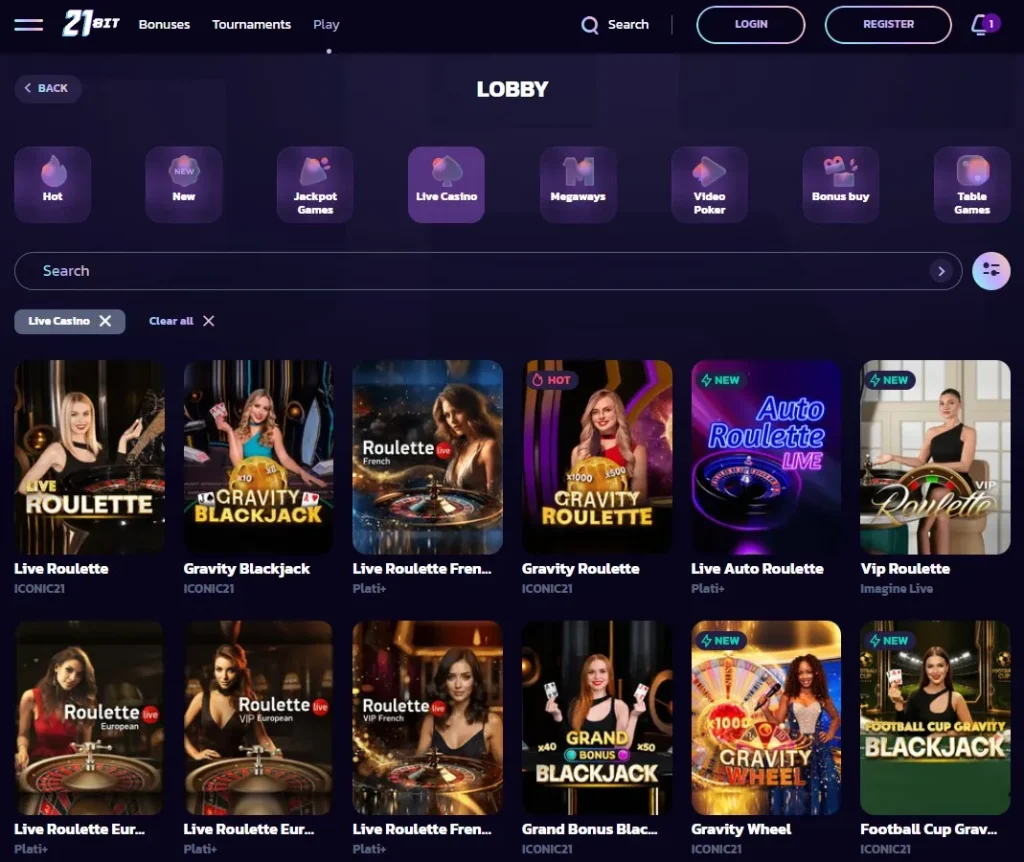
Game browsing is also part of the web interface. The current AU lobby exposes categories such as Hot, New, Jackpot Games, Live Casino, Megaways, Video Poker, Bonus Buy and Table Games. On a smaller screen, category navigation is more compressed, but the decision is the same as on desktop: select the relevant lobby section, use search when available, and open the game from the browser. For the library itself, see the 21bit games guide rather than treating mobile as a separate game catalogue.
The live casino is likewise a web category. Current AU pages expose live areas including blackjack, roulette, baccarat and live shows. A phone can therefore be used to reach those sections through the browser. This page does not make performance claims such as “zero lag” or “best mobile casino” because actual responsiveness depends on the phone, connection, game provider and the weight of the live stream.
Mobile deposits, banking and cashout access
21bit’s payment information is available through the web experience, so using a phone does not create a separate banking system. The verified payment categories include cards, e-wallets, bank-transfer routes and multiple cryptocurrencies, but the exact methods presented to an account can depend on the live cashier. The 21bit payment methods guide is the better place to compare deposit and payment categories in detail.
For withdrawals, mobile access does not remove account-level rules or KYC. A user can initiate or follow account actions from a phone, but the same verification and withdrawal terms still apply. Do not assume that a home-screen install changes limits, approval steps or processing targets. The install option is a different way to launch the same service, not a separate regulated product with different account rules.
When entering payment details on a small screen, the main practical risk is user error rather than a special mobile rule. Check the amount, selected payment method and destination details before confirming. With crypto, verify the address and network shown by the cashier. With cards or bank information, make sure the account details match your own account and any verification request.
Registration and KYC on a phone
The current AU registration page is short enough to complete on a mobile screen: it asks for an email address and password, provides an optional promo-code field, and requires acceptance of the terms, privacy policy and confirmation that the player is over 18. Registration is only the start of the account lifecycle. 21bit’s current terms allow identity checks and can require KYC before withdrawals.
If documents are requested, a phone can be convenient for photographing or uploading them, but the document requirements come from the KYC rules rather than from the device. Current official terms list government-issued photo identification and proof of address, and allow additional payment-method evidence to be requested. A camera-equipped phone therefore helps with submission, but it does not change what evidence the operator can ask for.
Keep images readable and account information consistent. Avoid cropping away identifying details that the verification request actually needs, while also avoiding unnecessary exposure of unrelated information when the operator’s instructions do not require it. The site can request extra documents, so there is no basis for promising that a two-file upload always completes verification.
Home-screen install versus a native store app
The best way to understand 21bit’s current install option is to separate convenience from provenance. A home-screen web install gives you an icon and a faster route back to the site. Depending on the browser and operating system, it can open in a more app-like window. What it does not prove is that Apple or Google has distributed a native casino application through its store.
- Browser bookmark
- A saved link that opens in the browser.
- Add to home screen
- A website shortcut or installable web experience launched from a device icon.
- Native store app
- A package distributed through an app store with a verifiable store listing.
21bit’s AU instructions fit the second description. This is why the page avoids saying “download the 21bit iOS app” or “get the Android app from Google Play”. If a current store listing appears in future, that would be new evidence and should be checked directly rather than inferred from the existing install page.
Which devices are a reasonable fit?
Because the verified product is browser-based, device compatibility is better assessed through current browser capability than through an unsupported list of phone models. Modern smartphones with an up-to-date browser are the intended type of device for this flow. The site itself exposes an AU mobile route and a home-screen installation path, but it does not provide a reliable public matrix guaranteeing performance across every iPhone, Android handset or tablet.
For live tables and graphics-heavy pokies, screen size, memory, browser version and connection quality can influence the experience. A newer phone on stable Wi-Fi or a strong mobile connection can behave differently from an older device on a congested network. Those are device and network variables, not verified casino-side guarantees.
If a game fails to load, first test the same title in a refreshed browser session before assuming it is unavailable to the account. Provider restrictions can also exist independently of mobile compatibility, especially in Australia. The main 21bit Australia review explains the wider Australian context, while the games pages deal with provider and title availability.
Support from mobile
21bit publishes 24/7 live-chat support and an email support channel. Those support routes matter on mobile because they give users a way to resolve account, payment or verification issues without switching to a desktop. If a cashier screen or verification request is unclear, use support to ask what the account currently requires rather than relying on a generic guide.
Take care with images sent to support. They can be useful for interface errors, but redact or avoid unrelated personal data where possible, and never share passwords. This is practical handling advice rather than a claim about a special mobile-security feature.
Mobile verdict for Australian users
The strongest verified claim is not “21bit has native apps for iPhone and Android”. It is that 21bit supports mobile browser use and offers an official AU installation flow that tells users to add the web experience to the home screen. That is enough for app-like access without overstating what has been verified.
Choose the browser route if you want the least ambiguous option. Use the home-screen installation feature if you want a dedicated icon. Treat any future claim about an App Store or Google Play release as a separate fact that needs a live store listing. For operator and Australian regulatory questions, see the 21bit licence and regulation guide.
This material was created by the 21bit Australia Guide team.
21bit Mobile Australia — More on this topic at 21bit casino.
See also 21bit Payment Methods Australia.
Related posts
21bit Withdrawals Australia: Limits, Processing and KYC
21bit Pokies Australia: Slots, Categories and Provider Restrictions